

Download Wikipedia Search Bar – Free IE Toolbar for Fast Wikipedia Look‑ups
Overview
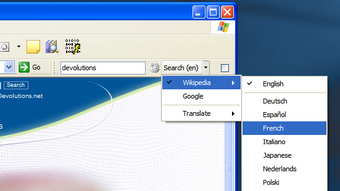
Wikipedia Search Bar is a lightweight, free toolbar extension designed exclusively for Internet Explorer on Windows platforms. Developed by Devolutions, this handy utility places a dedicated Wikipedia search field directly on the IE toolbar, allowing users to perform instant look‑ups without leaving the current web page. Since its inclusion in our catalog in 2006, the tool has amassed nearly 10,000 installations, with a steady stream of daily downloads that attest to its enduring popularity across regions such as India, the United Arab Emirates, and Germany.
The current version (1.0.0.5) was last updated on January 14, 2010, and supports Internet Explorer 7 as well as earlier versions, including Windows 2000 and legacy Windows releases. Its modest footprint—far smaller than most full‑featured browser extensions—means it won’t clutter your hard drive or slow down your browsing experience. Whether you’re a student researching quick facts, a professional needing fast reference checks, or simply a Wikipedia enthusiast, the Wikipedia Search Bar offers a secure, no‑frills solution that brings the world’s encyclopedia to your fingertips with a single click.
Key Features
- Instant Wikipedia Search: Type any query into the toolbar field and press Enter to retrieve the relevant Wikipedia article in a new tab.
- IE 7 Compatibility: Updated to work flawlessly with Internet Explorer 7 while retaining support for older IE versions.
- Lightweight Installation: The installer occupies less than 1 MB, ensuring minimal impact on system resources.
- English‑Only Interface: Streamlined UI presented entirely in English for clear, distraction‑free usage.
- Fixed Size Toolbar: The toolbar’s dimensions are locked, preventing accidental resizing that could affect other IE toolbars.
- Secure and Ad‑Free: No bundled adware or telemetry; the extension simply forwards your search query to Wikipedia.
- Easy Update Path: Future patches can be applied without uninstalling the existing version, preserving your toolbar settings.
Each of these features was engineered with the goal of delivering a focused, efficient search experience. By embedding the search field directly into the IE toolbar, Wikipedia Search Bar eliminates the need to open a separate browser window or navigate to the Wikipedia homepage first. This reduction in steps not only saves time but also minimizes the cognitive load for users who frequently reference Wikipedia while browsing other sites. The decision to keep the tool English‑only reflects the developer’s focus on a universal language that reaches the broadest audience, while the ad‑free design underscores a commitment to privacy and a clutter‑free interface. Moreover, the fixed size ensures that the toolbar remains visually consistent, preserving the familiar layout of Internet Explorer for users accustomed to a particular workflow.
Installation & Usage Guide
Installing Wikipedia Search Bar is straightforward, even for users with limited technical expertise. Follow these step‑by‑step instructions to get the toolbar up and running in just a few minutes:
- Download the Installer: Click the “Download” button below the article to retrieve the
WikipediaSearchBarSetup.exefile. The download is hosted on a secure server and is free of viruses or hidden installers. - Run the Setup: Double‑click the downloaded file. Windows User Account Control (UAC) may prompt you to confirm the installation; click “Yes” to proceed.
- Accept the License: The installer presents a brief End‑User License Agreement (EULA). Read it, then click “I Agree” to continue.
- Choose Installation Options: You can accept the default installation folder (usually
C:\Program Files\Wikipedia Search Bar) or browse to a custom location. Because the program is tiny, the default path is recommended. - Complete the Installation: Click “Install.” The process typically finishes within seconds. Once completed, click “Finish” to close the wizard.
- Enable the Toolbar: Open Internet Explorer. If the toolbar does not appear automatically, right‑click the toolbar area, select “Toolbars,” and ensure “Wikipedia Search Bar” is checked.
- Start Searching: Click inside the newly added Wikipedia search box, type a term (e.g., “Quantum mechanics”), and press Enter. The browser will open a new tab displaying the corresponding Wikipedia article.
The usage experience is intentionally minimalistic. There are no complex settings menus; the toolbar is ready to use immediately after installation. For users who wish to customize the behavior—such as opening results in the current tab instead of a new one—those options can be adjusted via the IE “Manage Add‑ons” interface under “Toolbars.” Additionally, because the toolbar only forwards queries to Wikipedia, it respects your privacy by not storing any search history locally. Should you ever need to uninstall the toolbar, simply navigate to “Control Panel → Programs and Features,” select “Wikipedia Search Bar,” and click “Uninstall.” The process removes all associated files without affecting other IE extensions.
System Compatibility & Requirements
Wikipedia Search Bar is built for Windows environments that still support Internet Explorer. Officially, it runs on:
- Windows 2000 (SP4) and later, including Windows XP, Vista, and Windows 7 (32‑bit editions).
- Internet Explorer 5.5, 6, and 7 – the toolbar is fully functional on all three versions.
Because the software was last updated in 2010, it does not include native support for modern browsers such as Microsoft Edge, Chrome, or Firefox. Users on newer Windows versions (Windows 8, 10, or 11) who still have IE installed for legacy purposes can also benefit from the toolbar, though performance may vary depending on the IE compatibility settings. The minimum system requirements are modest: a 1 GHz processor, 256 MB RAM, and at least 2 MB of free disk space.
No additional runtime libraries or frameworks are required, making the installation process painless even on older machines. If you are running a 64‑bit version of Windows, the 32‑bit toolbar will still operate under the WOW64 emulation layer, which Internet Explorer provides automatically. For users in regions with limited internet bandwidth, the small download size (under 1 MB) ensures a quick and secure acquisition, even on slower connections.
Pros, Cons, and Frequently Asked Questions
Pros
- Instant access to Wikipedia without leaving the current web page.
- Extremely lightweight – negligible impact on system resources.
- Free, secure, and ad‑free.
- Supports Internet Explorer 7 and earlier versions.
- Simple installation and removal process.
Cons
- Limited to Internet Explorer; not compatible with modern browsers.
- English‑only interface may not suit non‑English speakers.
- No advanced customization options beyond basic toolbar settings.
- Last updated in 2010, so may lack support for newer Windows security features.
FAQ
Is Wikipedia Search Bar safe to download?
Yes. The installer is signed by Devolutions and hosted on a secure server. It contains no malware, adware, or unwanted bundled software.
Can I use the toolbar on Windows 10?
You can, as long as Internet Explorer is still present on the system. The toolbar runs under the 32‑bit compatibility layer on 64‑bit Windows.
Does the toolbar store my search history?
No. Wikipedia Search Bar forwards the query directly to Wikipedia and does not retain any logs on your computer.
Will the toolbar interfere with other IE add‑ons?
Generally it coexists peacefully. If you experience conflicts, you can manage the order of toolbars via IE’s “Manage Add‑ons” dialog.
How do I remove Wikipedia Search Bar if I no longer need it?
Open Control Panel → Programs and Features, select “Wikipedia Search Bar,” and click “Uninstall.” The toolbar will be removed cleanly.
Conclusion & Call to Action
Wikipedia Search Bar delivers exactly what its name promises: a fast, secure, and unobtrusive way to query Wikipedia directly from Internet Explorer. While its niche focus on legacy browsers limits its appeal in a world dominated by Chrome and Edge, the tool remains an invaluable asset for users who still rely on IE for corporate or legacy web applications. Its tiny footprint, straightforward installation, and zero‑cost model make it a risk‑free addition to any Windows workstation. If you frequently reference Wikipedia while browsing, installing this toolbar can shave seconds off each lookup and keep your workflow uninterrupted.
Ready to boost your research speed? Free download the Wikipedia Search Bar now and experience seamless encyclopedia access right from your toolbar. Remember, the installer is lightweight, the tool is ad‑free, and you can uninstall it anytime with a single click. Enhance your browsing efficiency today!







